
Photo Collage Maker - FunPic
Photo Collage & Grid - Foto GridPhotography
4.43.51K Reviews
- Version
- 2.7.0
- Installs
- 10.00M
- Age Rating
- Everyone
Screenshots
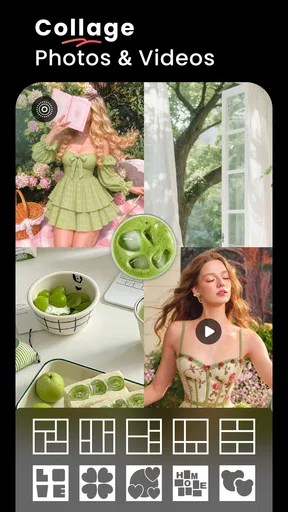






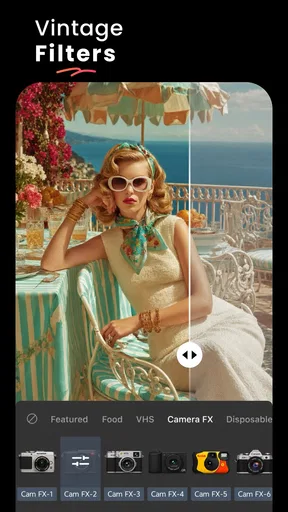
Our Review of Photo Collage Maker - FunPic
 Analysis by Appyee
I usually reach for a collage maker when several photos tell one small story better together than they do alone. Photo Collage Maker - FunPic is built around that simple idea, with photo collages as its main draw and a background eraser among its advertised uses. I see it as a practical choice for turning a handful of camera-roll pictures into a single image, rather than a replacement for a full photo editor.
A collage-first way to tell a story
The useful thing about a collage is not just fitting more pictures into one post. It lets you control what people notice first. A group of food photos can show a meal from several angles; a travel collage can pair a landscape with a small detail that would otherwise be lost in a separate post. FunPic’s focus on collage-making suits that kind of quick visual storytelling, especially when I want a result that feels arranged rather than like a plain album dump.
The background eraser adds another possible use: separating a subject from its original surroundings can help a cutout sit in a more deliberate composition. I would treat this as a creative shortcut, not a promise of perfect edges on every image. Hair, transparent objects, busy backgrounds, and low-contrast outlines are the sorts of details that can make any automatic or assisted cutout harder to clean up. If I were preparing an image for a polished campaign or print, I would inspect the edges closely and use a more precise editor if needed.
How I would use it in practice
For a quick collage, I would start by choosing photos that share a subject, color mood, or moment. That small bit of planning matters: a grid can make unrelated pictures feel crowded, while a consistent set gives the layout a clear purpose. I would also pick the strongest image first and reserve the most prominent space for it, then use the remaining photos to add context instead of competing for attention.
A useful workflow is to make a rough arrangement before spending time on decorative choices. If the images do not read well together in a basic layout, stickers or backgrounds are unlikely to fix the problem. Once the selection and order feel right, I would consider whether a cutout or changed background actually improves the story. Removing a background can draw attention to a person or object, but leaving the original scene intact may feel more natural for a family memory or travel recap.
That distinction is especially helpful for social posts. A collage intended to summarize a day should usually make the photos easy to scan on a phone. I would avoid squeezing in every shot just because there is room; fewer clear images can communicate more than a crowded composition. Before sharing, I would check that faces and important details remain visible at the size people are likely to see in a feed.
A realistic everyday use
Imagine I have taken several pictures during a weekend visit: one wide shot of the place, a close-up of something memorable, and a couple of pictures with friends. Instead of posting them separately, I could use FunPic to bring them into one collage, giving the wide view the lead and using the smaller images as supporting details. If one photo has a distracting background, the eraser could be worth trying, though I would compare the cutout with the untouched photo before deciding which looks more convincing.
This kind of small project is where a focused collage app can save effort. I do not need to build a complex design from scratch or open a desktop program just to combine a few pictures. The trade-off is that speed and simplicity matter more than fine control. If I want exact spacing, carefully layered typography, or a design that must match a strict brand style, I would choose a more advanced layout or image-editing tool.
First Impressions
Let’s dive right into the nitty-gritty. Installing the app is a breeze. Once you fire it up, you’re greeted with a sleek and intuitive interface. It’s colorful and friendly, making you feel like you’re about to embark on a fun creative journey rather than just editing photos. No more digging through endless menus to find what you need—the layout is clean and everything is at your fingertips.
The app opens up to a dashboard with options like Create Collage, Edit Photo, and Templates. Right from the get-go, it’s clear that the app is all about making your photo-editing experience as seamless as possible. And let’s face it, nobody likes spending hours figuring out how an app works, right?
Features That Stand Out
So, what makes it stand out in the crowded space of photo editing apps? For starters, the variety of templates is mind-blowing. Whether you’re looking to create a birthday greeting, a travel diary, or just a fun collage of your pet’s cutest moments, FunPic has got your back. The templates range from minimalistic and elegant to quirky and playful, fitting every mood and occasion.
One feature I find particularly nifty is the app’s editing tools. You can not only adjust brightness, contrast, and saturation but also add stickers, text, and even doodles. It’s like having a mini Photoshop right in your pocket. The best part? You don’t need to be a tech whiz to make the most of these features. The app guides you through each step, making it easy for anyone to create stunning images.
User Experience
Now, let’s talk about usability. The app is smooth and responsive. I’ve tested it on both my Android phone and an iOS device, and the performance is consistent. No annoying crashes or lagging. Just pure, uninterrupted creativity. The drag-and-drop functionality is a godsend, making it super easy to arrange your photos just the way you like them.
One thing I appreciate is the ability to share your creations directly to social media platforms or save them in high resolution to your device. It’s those little conveniences that make the app feel well-thought-out and user-centric.
Little Things That Make a Big Difference
Let’s not forget about those small but mighty features that can often be overlooked. The app includes a handy photo grid that helps you align your images perfectly, ensuring a polished end result. Also, the background choices are versatile—from solid colors to gradients and patterns, giving your collage that extra oomph it needs to stand out.
For a cleaner result, I would treat the grid as a guide rather than trying to fill every space. Repeating a background color across a collage can make a mixed set of photos feel more connected, while a patterned backdrop can become distracting if the images already contain busy details. I would preview the whole composition before adding extra decoration, then remove anything that pulls attention away from the pictures.
Now, I know what you’re thinking: “Surely, there must be a catch!” Well, while the app is free to download and use, some premium features and templates are locked behind a paywall. But honestly, even the free version is packed with enough tools and templates to keep you busy for days.
Where it fits among photo apps
Compared with a standard photo editor, a collage maker is more direct when the goal is arranging several images into one shareable composition. A general editor may offer deeper control over a single photograph, but it can take longer to assemble a multi-photo layout. A social platform’s built-in layout tools can be convenient for a quick post, yet they are less suited to someone who wants to spend a little time adjusting the look before sharing. FunPic sits in that middle ground: more composition-focused than a basic edit, without asking me to approach the task like a designer using professional software.
That focus also defines its limits. I would not pick it as my main tool for retouching a portrait, correcting difficult lighting, or producing a precise layered graphic. Collages can make a set of images feel finished, but they cannot rescue a blurry or poorly lit source photo. I would make basic choices about which pictures to use before opening the editor, rather than expecting the layout itself to solve every photo problem.
Who gets the most from it
I think this app makes the most sense for people who regularly share memories, event recaps, pet photos, or small collections of product pictures and want an uncomplicated way to combine them. It is also a good fit for someone who enjoys experimenting with templates and visual accents but does not want to learn a complicated design program. The ability to try a background change gives casual creators another way to make a subject stand out without building a composition from scratch.
On the other hand, I would steer away from it if my priority were meticulous graphic design, extensive image repair, or a professional workflow with exact control over every layer. I would also skip a collage when the images are stronger on their own; combining them is not automatically an improvement. For a single photo that needs careful correction, a dedicated photo editor is the more sensible choice.
FunPic is a free photography app from Photo Collage & Grid - Foto Grid. It has a 4.4 average from around 332,000 ratings, and it has been installed over 10 million times. It is rated for Everyone, so its stated age classification is suitable for a broad audience. The current version is 2.5.0, and it runs on operating systems from version 7.0 onward. Optional in-app purchases range from $9.99 to $25.99 per item, so I would explore the free tools first and only consider paying if a particular extra is useful to my routine.
Your Creative Companion
So, is it worth downloading? Absolutely. Whether you’re a social media enthusiast looking to impress your followers or just someone who enjoys a bit of creative fun, this app is a fantastic choice. It’s user-friendly, feature-rich, and downright fun to use.
In a nutshell, Photo Collage Maker - FunPic is more than just an app; it’s your personal creative studio on the go. So why not give it a whirl and let your creative juices flow? You might just surprise yourself with what you can create!
Verdict
Strengths of Photo Collage Maker - FunPic
- User-friendly interface for quick edits.
- Wide variety of templates available.
- High-resolution export options.
- Seamless social media sharing.
- Customizable stickers and text options.
Limitations of Photo Collage Maker - FunPic
- Contains ads that interrupt editing.
- Limited features in free version.
- Occasional crashes on older devices.
- In-app purchases can be pricey.
- Requires internet for full functionality.
Similar Picks in This Category
View All
Google Photos
Google LLC4.4

Gallery
Google LLC4.2

Picsart AI Photo Editor, Video
PicsArt, Inc.3.9

B612 AI Photo&Video Editor
SNOW Corporation4.1

BeautyPlus-Selfie Photo Editor
PIXOCIAL TECHNOLOGY (SINGAPORE) PTE. LTD.4.5

Remini - AI Photo Enhancer
Bending Spoons4.1
Frequently Asked Questions
What features does Photo Collage Maker - FunPic offer?
Photo Collage Maker - FunPic offers a variety of features including customizable templates, a wide range of stickers and filters, and easy-to-use editing tools. Users can also adjust the layout, add text, and apply backgrounds to create personalized collages. The app supports high-resolution exports for quality sharing.
Is Photo Collage Maker - FunPic free to use?
Photo Collage Maker - FunPic is free to download and use, but it includes optional in-app purchases. These purchases provide access to premium templates, advanced editing tools, and an ad-free experience. Users can enjoy the basic features without cost, but the premium options enhance functionality.
Can I share my collages directly from the app?
Yes, Photo Collage Maker - FunPic allows users to share their creations directly from the app. You can post your collages on social media platforms like Instagram, Facebook, and Twitter, or send them via email and messaging apps. The app ensures that sharing is seamless and efficient.
Does the app require an internet connection?
Photo Collage Maker - FunPic can be used offline for creating and editing collages, but an internet connection is needed for downloading additional templates and stickers. Also, internet access is required for sharing your collages on social media or through email and messaging services.
Is Photo Collage Maker - FunPic available on both Android and iOS?
Yes, Photo Collage Maker - FunPic is available for download on both Android and iOS devices. The app is designed to provide a consistent user experience across both platforms, ensuring that users can enjoy all the features regardless of their device preference.
